Your Child's ESA Award Is Worth Thousands — One Rejected Receipt Shouldn't Cost You Hundreds
Arizona's Empowerment Scholarship Account puts $7,000 to $47,000+ per child into your hands every year. That money can fund private school tuition, curriculum, tutoring, therapy, educational technology — nearly anything that advances your child's education.
But the program comes with a 80+ page Parent Handbook written in administrative language, a ClassWallet platform that rejects transactions without explaining why, and an audit process that looks back two years. One misclassified receipt. One grey-area purchase without the right curriculum justification. One missed quarterly deadline. Any of these can freeze your account, deny a reimbursement you already spent out of pocket, or trigger a formal misuse finding.
Parents in Facebook groups share advice freely — but they are working from different program years, different eligibility categories, and different personal experiences. The advice that saved one family's reimbursement might flag yours.
The ESA Compliance System — Every Rule, Every Workaround, One Guide
The Arizona ESA Parent Guide is a complete compliance system that translates the entire Empowerment Scholarship Account program into plain English. It is not a tip sheet or a printable tracker. It is a 53-page reference manual built from current statutes (A.R.S. §§ 15-2401–2406), State Board of Education rules, and real-world rejection patterns — organized so you can look up any question and get an answer with a verifiable source.
Where the Parent Handbook uses phrases like "qualified educational expenses as determined by the Department," this guide tells you exactly which items have been approved, which have been denied, and what curriculum justification language to use for the grey areas in between.
What's Inside
- Eligibility and documentation maps — the eight categorical tracks (universal, disability, military, foster, reservation, D/F school, sibling, deaf/blind parent), the exact documents each requires, and the residency proof ADE actually accepts
- Application walkthrough — every screen of the ADEConnect portal, step by step, with a timing table showing how your sign-up quarter affects your annual payout
- Award amount calculator — the base $7,000–$8,000 universal award, the disability-weighted tiers up to $37,000+, and the proration schedule so you know exactly what to expect
- Approved expense categories — tuition, curriculum, tutoring, therapy, technology, testing, and extracurriculars, with the specific rules for each and the items ADE has historically denied
- Grey-area expense clearance — musical instruments, PE equipment, 3D printers, museum memberships, software subscriptions, and other commonly questioned purchases, with copy-paste curriculum justification templates
- ClassWallet mastery — how Marketplace orders, Direct Pay to vendors, and out-of-pocket reimbursements each work, plus the receipt formatting rules that prevent rejections before they happen
- Audit readiness framework — what triggers an ADE compliance review, the two-year lookback period, how to organize your records, and what to do if you receive a misuse finding or account suspension
- The ESA-to-homeschool legal switch — why an ESA student is not a homeschooler under Arizona law, what happens to your county affidavit, and the step-by-step transition for families moving between the two statuses
- Annual renewal and carryover — exactly when and how to renew your contract each year, and what happens to unspent funds
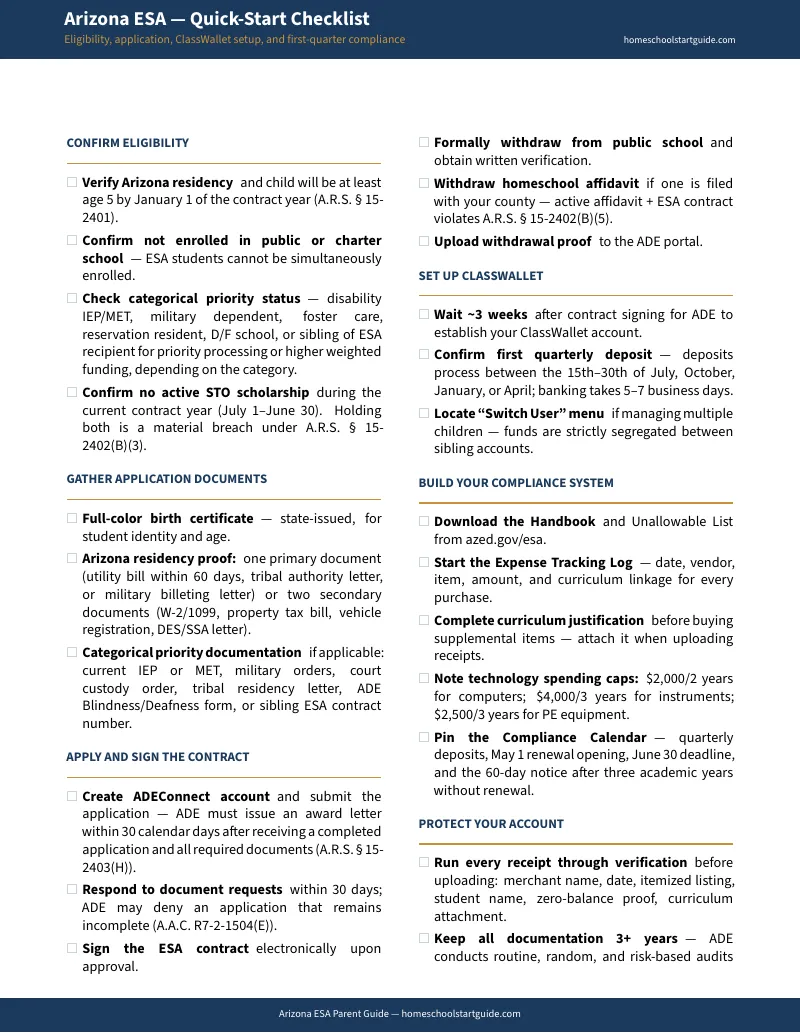
- Quick-start checklist — a printable two-page checklist covering every milestone from application through first purchase
- Six printable planning tools — an ESA Compliance Calendar with every critical deadline, an Expense Tracking Log for quarterly audit records, a Receipt Verification Checklist for pre-upload quality control, a Curriculum Justification Template for grey-area purchases, a Grey-Area Expense Decision Checklist, and a Transition Planning Worksheet for families comparing public school services against ESA-funded alternatives
Who This Guide Is For
- Parents pulling a child out of public or charter school who need to apply for the ESA and set up their account correctly the first time
- Homeschooling families exploring the ESA who want to understand whether accepting state funding changes their legal status (it does) and what obligations come with it
- Current ESA families who have had reimbursements rejected, are confused about grey-area expenses, or want to be audit-ready before their next compliance review
- Military families, foster and adoptive parents, and families of children with disabilities who qualify for priority processing or higher-weighted awards and need to know the documentation requirements
- Micro-school and co-op families using ESA funds for tuition who need to understand Direct Pay rules, tuition add-on restrictions, and multi-child funding splits
Why Not Just Use the Free Resources?
The ADE Parent Handbook is the official source — and it is written to protect the state, not to protect you. It defines "qualified educational expenses" in language vague enough to justify both approvals and denials of the same item. It does not explain why reimbursements get rejected, what triggers an audit, or how to write a curriculum justification that survives a compliance review.
ClassWallet's help center teaches you how to click buttons on the platform. It cannot tell you why ADE's compliance officers denied the purchase you uploaded through those buttons.
HSLDA publishes cautionary overviews of the ESA but explicitly does not provide operational guidance for families using it. AFHE, Arizona's primary homeschool advocacy group, declines to support ESA families at all.
Etsy and Teachers Pay Teachers sell expense trackers and printable binders for a few dollars. They help you log what you spend. They do not tell you what you can spend it on, what to do when it is denied, or how to prepare for the audit that comes two years later.
Private ESA consultants charge $75 to $150 per hour, or $500 to $1,500 per year for full account management. They answer questions one at a time. This guide answers all of them at once, permanently, for a fraction of a single consultation hour.
Satisfaction Guarantee
Full refund, no time limit. If the guide does not give you clarity on every aspect of managing your ESA, email [email protected] and you will get your money back.
Your Child's Education Funding Is Waiting
The ESA application portal is open year-round. Every quarter you wait is a quarter of funding you do not receive — a July start gets four payments, an April start gets one. The guide is ready when you are.
Get the Arizona ESA Parent Guide →
Already have the free checklist? Upgrade to the full guide →